Microsoft Access ChatGPT AI Exception Detection Database Template
Most organizations don’t have a shortage of data—they have a shortage of time to spot the few records that actually matter. The painful reality is that exceptions hide in plain sight: duplicate invoices, future-dated entries, negative amounts entered without context, category mismatches, unusually large vendor charges, and “penny” transactions that don’t belong. These records can slip into reports, distort financial totals, trigger failed exports, or create audit headaches long after the person who entered the data has moved on. WSI’s AI Exception Detection Database Template demonstrates how Microsoft Access can use AI to automatically flag suspicious records, explain why they look abnormal, and recommend next actions—turning your database into a practical early-warning system.
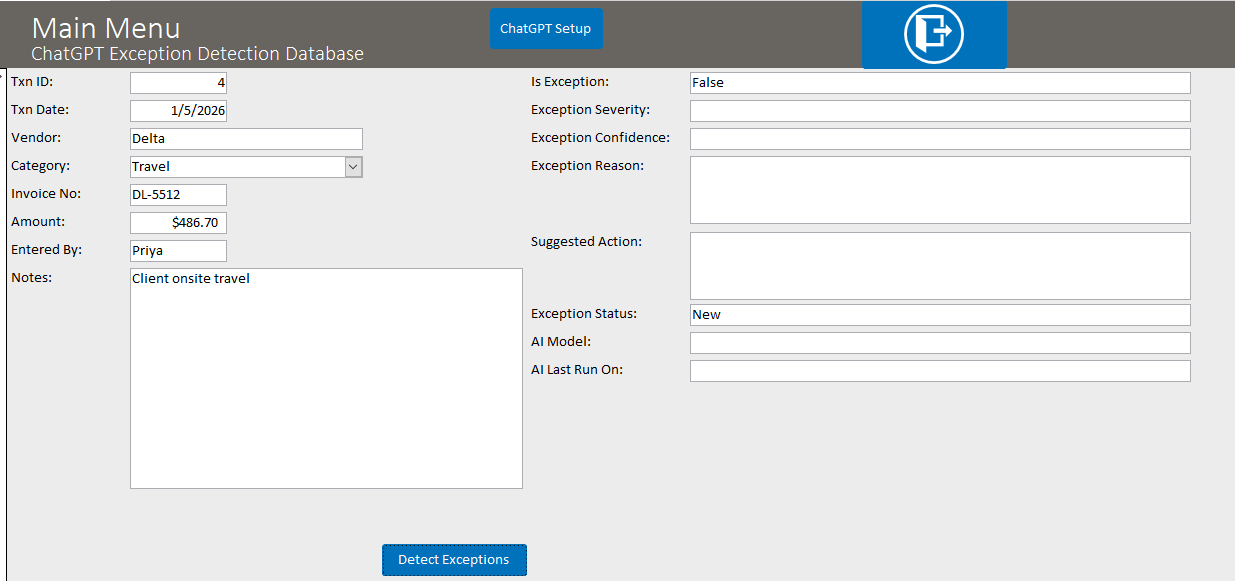
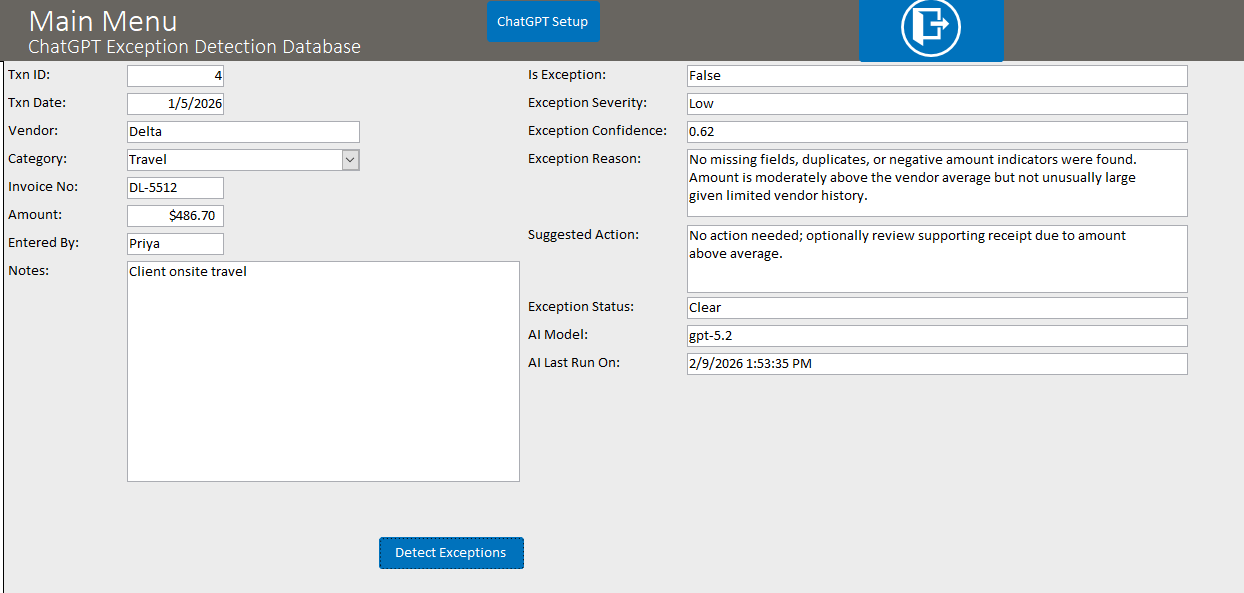
This template keeps things intentionally simple so the value is obvious. It uses a small Transactions table (with realistic sample data that includes both normal entries and deliberately “weird” ones) and provides a one-click workflow such as “Detect Exception” for the current record (or optionally scan all new records in a batch). The AI returns a structured decision—IsException, Severity, Confidence, a plain-English Reason, and a suggested Action—which Access stores directly in normal fields. Users can then mark the record as Detected, NeedsReview, Reviewed, or Resolved, creating a clean, auditable workflow instead of relying on “someone noticing it later.” If you want this capability built into your real Access database and tuned to your business rules, Contact Us.
What This Template Does
Exception detection is not just about catching “bad data.” It’s about identifying the few records that deserve a second look before they impact reporting, billing, approvals, compliance, or customer experience. This template demonstrates a fast, repeatable triage process that can be expanded into production-grade workflows.
- Flags suspicious records: Identifies transactions that look unusual based on common anomaly signals.
- Assigns severity and confidence: Labels exceptions as Low/Medium/High and provides a confidence score so users know what deserves immediate attention.
- Explains the “why” in plain English: Produces a short reason (e.g., “Amount is far above vendor’s typical range,” “Invoice number appears duplicated,” “Missing invoice/vendor,” “Future-dated,” “Category mismatch”).
- Suggests a next step: Recommends an action such as “verify invoice,” “request approval,” “confirm duplicate,” “correct category,” or “confirm refund/credit memo.”
- Supports a review workflow: Tracks status such as New ? Detected ? Reviewed ? Resolved so nothing falls through the cracks.
- Optional logging: Stores prompts and responses for transparency, troubleshooting, and auditability.
Why Exception Detection Is Valuable in Real Access Databases
Access is often the operational backbone of a department: invoices, billing, shipments, time tracking, inventory movements, reimbursements, and more. In these systems, a small number of exceptions can create big consequences. AI exception detection helps you catch the “needle in the haystack” while still keeping humans in control of the final decision.
- Better accuracy: Reduces distorted totals and reporting errors caused by outliers and duplicates.
- Less time spent hunting: Instead of scanning long lists, users focus on the records that truly look abnormal.
- Stronger internal controls: Creates a consistent review trail for approvals, audits, and compliance.
- Faster corrections: The sooner an exception is found, the cheaper it is to fix.
Example Exception Types Demonstrated
The template includes sample records that represent common real-world “gotchas” that teams deal with every week. The same logic can be adapted to your own tables and workflows.
- Outlier amounts: Unusually large charges compared to historical vendor patterns.
- Duplicate invoice numbers: Same vendor + same invoice number appearing multiple times.
- Missing key identifiers: Missing vendor or missing invoice number.
- Negative values without context: Refund/credit patterns that lack notes or documentation.
- Category mismatch: A vendor typically associated with software entered as office supplies (or similar).
- Suspicious tiny values: “Penny” or near-zero transactions that may indicate test entries or mistakes.
- Future-dated entries: Transactions dated in the future that can skew period reporting.
How WSI Expands This Beyond the Demo
This template is the starter version. In real systems, exception detection becomes even more powerful when it is tailored to your rules, your baselines, and your workflows. WSI can integrate exception logic directly into your existing forms, import processes, reporting cadence, and approval steps—so anomalies are caught early and handled consistently.
- Business-specific rules: Thresholds by vendor, category, department, cost center, or contract terms.
- Batch scanning: Automatically scan new records nightly or on-demand and create an “Exception Review” worklist.
- Escalation workflows: Route high-severity exceptions for approval or management review.
- Better dashboards: Track exception counts by type, vendor, user, or period to spot trends.
- Safe governance: Optional logging and controlled outputs so AI supports your process without “mystery decisions.”
If you want AI-powered exception detection inside your Microsoft Access database—tuned to your data, your risk areas, and your reporting needs—Contact Us. Tell us what kinds of exceptions cost you the most time today, and we’ll recommend a simple first version that produces immediate value and can expand over time.
If you're considering integrating this capability into a .NET application, another language model, or any API resource, WSI stands ready to assist. Connect with us for tailored solutions for your unique Microsoft Access and API integration needs.
Purchase Prices
$99.99—Internal Use—This product allows you to use this database template however you wish within your organization.
$199.99—Unlimited Developer Use—This version allows you to use this database template however you wish for any applications you develop and distribute.
Download a Demonstration
Download a demo version for free to test! The demo version is in Access 2010, which will work with either Access 2010, 2013, 2016, 2019 or Office 365. If you need a previous version of Access to try, please
Contact Us. Please note that the demo version of the software is fully functional, but does not store any data once you close the database; the full version of the software, available for purchase, stores data in the database permanently.
The ChatGPT Microsoft Access Exception Detection Database is a full-featured ChatGPT management system built all in Microsoft Access tables, forms, reports, and VBA (Visual Basic for Applications) code. This database template has the advantage of being 100% Access based. This aspect allows for smooth and easy integration into your existing Access Database. The ChatGPT Microsoft Access Natural-Language Search Database offers a simple interface to generate a database question and get a response.
A ChatGPT open AI API key is required to run the code - which can be attained at: ChatGPT
Download a Demonstration
Download a demo version for free to test! The demo version is in Access 2010, which will work with either Access 2010, 2013, 2016, 2019 or Office 365. If you need a previous version of Access to try, please
Contact Us. Please note that the demo version of the software is fully functional, but does not store any data once you close the database; the full version of the software, available for purchase, stores data in the database permanently.
Full Version and Live Demonstration Options
Live demonstration
To experience a more interactive and personalized demonstration of this WSI template, we invite you to contact WSI and schedule a live demonstration with one of our team members. This opportunity allows you to engage directly with us, either as an alternative to or in conjunction with downloading and exploring the demo version of the template at your leisure.
Please note that downloading Microsoft Office files, including Microsoft Access database files, might trigger a security warning on your computer. To avoid this and get a comprehensive overview, you have the option of viewing the template through a virtual meeting on Teams or Zoom with a WSI representative.
After purchase
Once you purchase the database template, you will receive the full version of the database in a standard Access Database file. The purchased database will have full access to the database window, all design objects, the Visual Basic project code, and you will be able to modify or add to the design in any way you wish. This does not apply to run-time or compiled versions.
If you lack the time to integrate this database into your system, please Contact Us and we will be glad to help with your integration process. If you like the basics of what you see in the database, but need enhancements to make the system functional for your business, please Contact Us and we will develop a quote for the additional features you require.
Purchase Prices
$99.99—Internal Use—This product allows you to use this database template however you wish within your organization.
$199.99—Unlimited Developer Use—This version allows you to use this database template however you wish for any applications you develop and distribute.
After Your Purchase
Delivery timing
Once your purchase is complete, you will receive an email within 12 hours, and usually sooner during standard business hours, with a link to download the full version of the database. Please check your junk mail folder if you do not see the message.
Implementation help
If you need help implementing this function or need modifications for your requirements, request a free quote for your Microsoft Access development needs. WSI will determine your needs based on written requirements that you provide. Please ask your WSI representative for an example of sufficient written requirements.
Support and customization
WSI offers optional paid support and customization programming services. WSI templates are priced based on the purchaser self-supporting the database. WSI assumes purchasers who do not wish to pay WSI for support have the Microsoft Access and SQL Server knowledge needed to install, customize, and use the template. Paid support is available by the hour; please contact us for the current hourly fee.
Planning your changes
If you need assistance preparing requirements, WSI offers fee-based services to help document what needs to be done. You can also review our process mapping service or learn more about the WSI quoting process.
Testimonials
What Customers Say About WSI
"Once again, you guys have outdone yourself. The service and support you have provided has been the best I've ever experienced from a software development team. You guys have the best Access calendar GUI I've ever seen."
Mike Mattas
New-Tech Systems
Plainfield, IL
"Thanks to all!! Nice job on the changes. They look good, thanks for your quick response!!"
George Ells
Tulip Systems, Inc.
Pittsburgh, PA
"Thanks for all your help. Your service is great as I find you and your team easy to deal with and very responsive in terms of getting the changes done. Great work."
Steve Da Silva
Manager, Customer Support
The Hospital for Sick Children
Toronto, Ontario, Canada
"With the expertise of Andres the database was put in the store for use just 4 days later. The efficiency of his programming and the added benefit of video to refer back to in case of small adjustments brought what seemed like a daunting task into reality very quickly."
Debbie Hunt
Controller
Glendon Bald Eagle Holdings Ltd.
British Columbia, Canada
"Bottom Line: Winning Solutions is hands down the most polite, professional, committed, able, and proven company I have ever worked with. Their staff, top to bottom, are all winners."
Dave Yeadon
Dakota Steel & Trim
Canton, SD
"Our Service Dept is enjoying the Calendar. We adapted the Enhanced Microsoft Access Calendar to meet our needs. The Service Manager and Advisors enjoy the ease of booking work."
Richard "Dick" Milliken
Whited Peterbilt
Bangor, Maine