ChatGPT Microsoft Access Natural-Language Search + Q&A Database Template
What if your Microsoft Access database could understand plain-English questions and instantly return the right records—without users needing to know table names, field names, or how to build filters? WSI’s Natural-Language Search + Q&A Database Template demonstrates exactly that. This template is a practical, easy-to-understand example of how you can add an “Ask the Database” experience to Microsoft Access so users can type questions like “Show overdue open tickets assigned to Sam” or “Show tickets created between Jan 10 and Jan 27” and get an immediate, usable result set displayed right inside Access.
Unlike gimmicky demos that feel disconnected from real business workflows, this template is designed to be something you could actually deploy. It illustrates a safe, scalable pattern: AI interprets the user's request (what they want to know based strictly on the information in the database) and Access runs approved queries and filters (how to retrieve it). The outcome is powerful: your team can search and analyze data faster, reduce training time, and unlock more value from the database you already depend on. If you want WSI to tailor this concept to your database, Contact Us.
What This Template Does
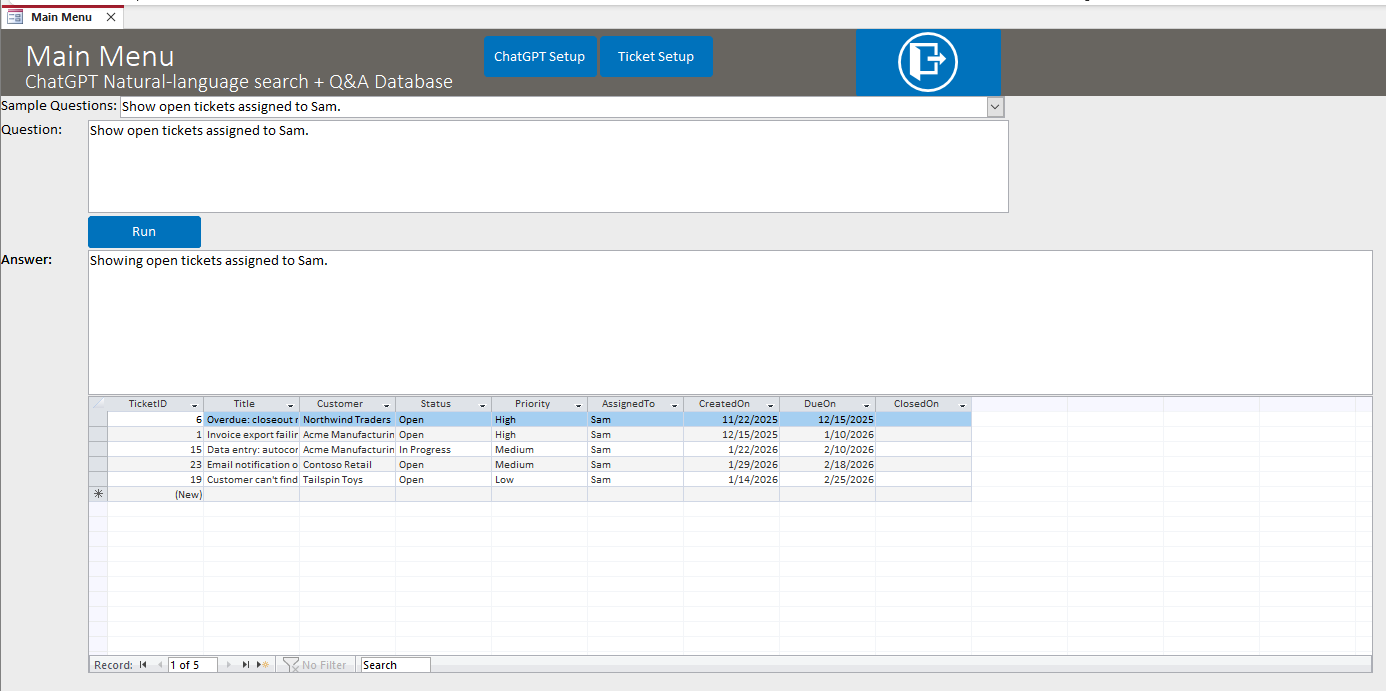
This template database showcases how Microsoft Access can deliver a modern, AI-assisted “database search assistant” experience. Users enter a question in plain language, and the system returns both a human-friendly explanation and a live datasheet of results—the same kind of output your users already trust in Access forms.
- Natural-language search: Users type questions instead of building filters manually.
- Q&A style results: The system responds with a short explanation of what it did and what it’s showing.
- Safe “intent routing”: AI maps questions to supported search types and parameters rather than generating risky free-form SQL.
- Dynamic filtering: Demonstrates filters such as customer, assigned-to, status exclusions, and date-based criteria.
- Date logic that makes sense to users: “On / before / after / between” filtering is handled in a business-friendly way.
Examples of Questions Users Can Ask
The template is intentionally simple, but it clearly demonstrates how powerful this approach can be when applied to a real production database. Sample questions include:
- Overdue workflows: “Show overdue open tickets.”
- Assignment-based search: “Show overdue open tickets assigned to Sam.”
- Customer-specific views: “Show tickets for Acme Manufacturing.”
- Priority-based triage: “What open high priority tickets do we have? Exclude In Progress.”
- Date-driven queries: “Show tickets created on 1/27/26.” “Show tickets due before 2/1/26.” “Show tickets closed between 1/1/26 and 1/31/26.”
Why Natural-Language Search Matters in Microsoft Access
Microsoft Access is still one of the most efficient ways to build data-driven business applications, but many databases become “expert-only” over time. Users forget how to search, don’t know which form to open, or struggle to choose the right filters. Natural-language search reduces that friction dramatically by letting people interact with the database the way they already think and speak.
- Lower training burden: New staff can become productive faster.
- Faster answers: Users spend less time hunting for the right report or query.
- More consistent results: AI-guided search can steer users toward the correct interpretation and output.
- Better adoption: When searching feels easy, people rely on the database more—and your data quality improves.
How It Works
The template uses a proven, production-friendly strategy. Instead of letting an AI model write arbitrary SQL, we guide it to return structured instructions in a predictable format (JSON). Access then uses those instructions to run queries and apply filters. This provides the “wow factor” of AI while keeping performance and reliability grounded in the database design.
- Step 1: User types a question in plain English.
- Step 2: AI identifies the intent (what the user is trying to find) and extracts parameters (who, what, dates, exclusions).
- Step 3: Access runs a supported query (or a controlled SQL statement) and applies validated filters.
- Step 4: Access displays results in a datasheet and shows a concise summary of what was returned.
YOUR data, never leaves YOUR computer. WSI has designed this so that you can leverage AI’s power without sending your data to the AI.
What You Can Implement in Your Own Access Database
This template is a starting point. In real projects, WSI can extend this approach to match your schema, security model, and business workflows. Depending on your needs, we can implement features such as:
- Role-aware AI search: Search results respect user permissions and data visibility rules.
- More intents and search types: Expand from simple “tickets” searches to inventory, customers, orders, compliance logs, HR records, and more.
- Search across related tables: Join across customers, orders, and line items while keeping logic maintainable.
- Saved “AI searches”: Turn common natural-language questions into one-click shortcuts for users.
- Better summaries: Show record counts, key totals, earliest/latest dates, and quick breakdowns for decision-makers.
- SQL Server support: If your back end is SQL Server (or moving to it), we can scale this approach for larger datasets and more users.
Why WSI
AI features are fun, but harder to make reliable in a real business database. WSI specializes in building Microsoft Access systems that actually run organizations—and we know how to implement AI in a way that is useful, safe, and maintainable. We can help you choose the right use cases, and integrate AI search directly into your existing forms and workflows so users don’t need to change how they work—just how quickly you get answers.
If you want this Natural-Language Search + Q&A capability in your Microsoft Access database, Contact Us and tell us what your database does, who uses it, and what users struggle to find. We’ll help you define a practical first version and a roadmap for expanding capabilities over time.
If you're considering integrating this capability into a .NET application, another language model, or any API resource, WSI stands ready to assist. Connect with us for tailored solutions for your unique Microsoft Access and API integration needs.
Purchase Prices
$99.99—Internal Use—This product allows you to use this database template however you wish within your organization.
$199.99—Unlimited Developer Use—This version allows you to use this database template however you wish for any applications you develop and distribute.
Download a Demonstration
Download a demo version for free to test! The demo version is in Access 2010, which will work with either Access 2010, 2013, 2016, 2019 or Office 365. If you need a previous version of Access to try, please
Contact Us. Please note that the demo version of the software is fully functional, but does not store any data once you close the database; the full version of the software, available for purchase, stores data in the database permanently.
The ChatGPT Microsoft Access Natural-Language Search Database is a full-featured ChatGPT management system built all in Microsoft Access tables, forms, reports, and VBA (Visual Basic for Applications) code. This database template has the advantage of being 100% Access based. This aspect allows for smooth and easy integration into your existing Access Database. The ChatGPT Microsoft Access Natural-Language Search Database offers a simple interface to generate a database question and get a response.
A ChatGPT open AI API key is required to run the code - which can be attained at: ChatGPT
Download a Demonstration
Download a demo version for free to test! The demo version is in Access 2010, which will work with either Access 2010, 2013, 2016, 2019 or Office 365. If you need a previous version of Access to try, please
Contact Us. Please note that the demo version of the software is fully functional, but does not store any data once you close the database; the full version of the software, available for purchase, stores data in the database permanently.
Full Version and Live Demonstration Options
Live demonstration
To experience a more interactive and personalized demonstration of this WSI template, we invite you to contact WSI and schedule a live demonstration with one of our team members. This opportunity allows you to engage directly with us, either as an alternative to or in conjunction with downloading and exploring the demo version of the template at your leisure.
Please note that downloading Microsoft Office files, including Microsoft Access database files, might trigger a security warning on your computer. To avoid this and get a comprehensive overview, you have the option of viewing the template through a virtual meeting on Teams or Zoom with a WSI representative.
After purchase
Once you purchase the database template, you will receive the full version of the database in a standard Access Database file. The purchased database will have full access to the database window, all design objects, the Visual Basic project code, and you will be able to modify or add to the design in any way you wish. This does not apply to run-time or compiled versions.
If you lack the time to integrate this database into your system, please Contact Us and we will be glad to help with your integration process. If you like the basics of what you see in the database, but need enhancements to make the system functional for your business, please Contact Us and we will develop a quote for the additional features you require.
Purchase Prices
$99.99—Internal Use—This product allows you to use this database template however you wish within your organization.
$199.99—Unlimited Developer Use—This version allows you to use this database template however you wish for any applications you develop and distribute.
After Your Purchase
Delivery timing
Once your purchase is complete, you will receive an email within 12 hours, and usually sooner during standard business hours, with a link to download the full version of the database. Please check your junk mail folder if you do not see the message.
Implementation help
If you need help implementing this function or need modifications for your requirements, request a free quote for your Microsoft Access development needs. WSI will determine your needs based on written requirements that you provide. Please ask your WSI representative for an example of sufficient written requirements.
Support and customization
WSI offers optional paid support and customization programming services. WSI templates are priced based on the purchaser self-supporting the database. WSI assumes purchasers who do not wish to pay WSI for support have the Microsoft Access and SQL Server knowledge needed to install, customize, and use the template. Paid support is available by the hour; please contact us for the current hourly fee.
Planning your changes
If you need assistance preparing requirements, WSI offers fee-based services to help document what needs to be done. You can also review our process mapping service or learn more about the WSI quoting process.
Testimonials
What Customers Say About WSI
"Once again, you guys have outdone yourself. The service and support you have provided has been the best I've ever experienced from a software development team. You guys have the best Access calendar GUI I've ever seen."
Mike Mattas
New-Tech Systems
Plainfield, IL
"Thanks to all!! Nice job on the changes. They look good, thanks for your quick response!!"
George Ells
Tulip Systems, Inc.
Pittsburgh, PA
"Thanks for all your help. Your service is great as I find you and your team easy to deal with and very responsive in terms of getting the changes done. Great work."
Steve Da Silva
Manager, Customer Support
The Hospital for Sick Children
Toronto, Ontario, Canada
"With the expertise of Andres the database was put in the store for use just 4 days later. The efficiency of his programming and the added benefit of video to refer back to in case of small adjustments brought what seemed like a daunting task into reality very quickly."
Debbie Hunt
Controller
Glendon Bald Eagle Holdings Ltd.
British Columbia, Canada
"Bottom Line: Winning Solutions is hands down the most polite, professional, committed, able, and proven company I have ever worked with. Their staff, top to bottom, are all winners."
Dave Yeadon
Dakota Steel & Trim
Canton, SD
"Our Service Dept is enjoying the Calendar. We adapted the Enhanced Microsoft Access Calendar to meet our needs. The Service Manager and Advisors enjoy the ease of booking work."
Richard "Dick" Milliken
Whited Peterbilt
Bangor, Maine