Microsoft Access AI Predictive Insights Database Template
Most Microsoft Access databases do a great job recording what already happened—tickets created, jobs completed, orders shipped, issues closed. But the real business value often comes from answering the next question: What is likely to happen next? WSI’s AI Predictive Insights Database Template demonstrates how you can add practical “forward-looking” intelligence to a simple Access tracking system—so users can see which work items are most likely to miss due dates, how long items typically take to close, and which tasks deserve attention first. This template is intentionally basic, but it clearly showcases how Access can evolve from a historical system of record into a tool that supports planning, prioritization, and smarter decision-making.
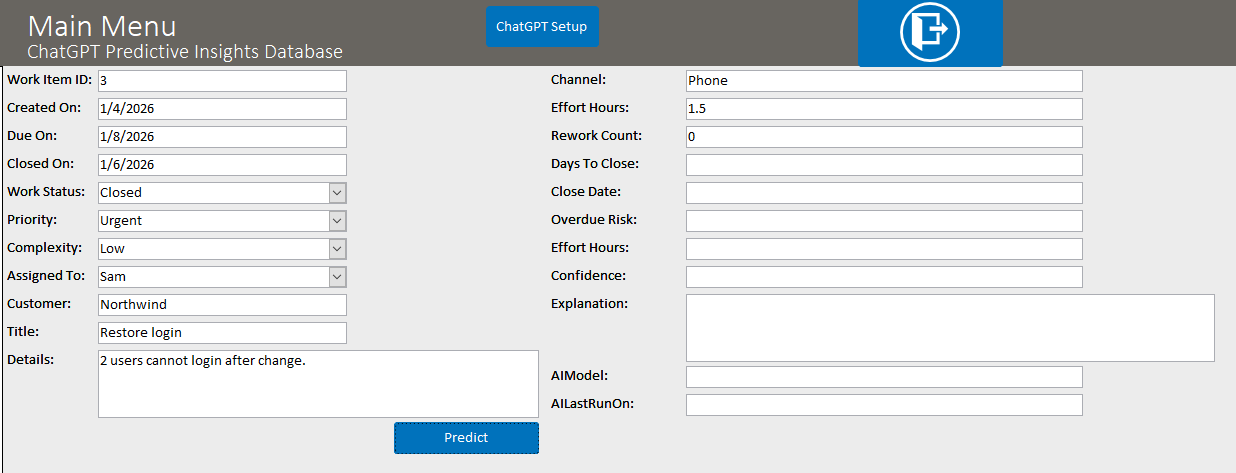
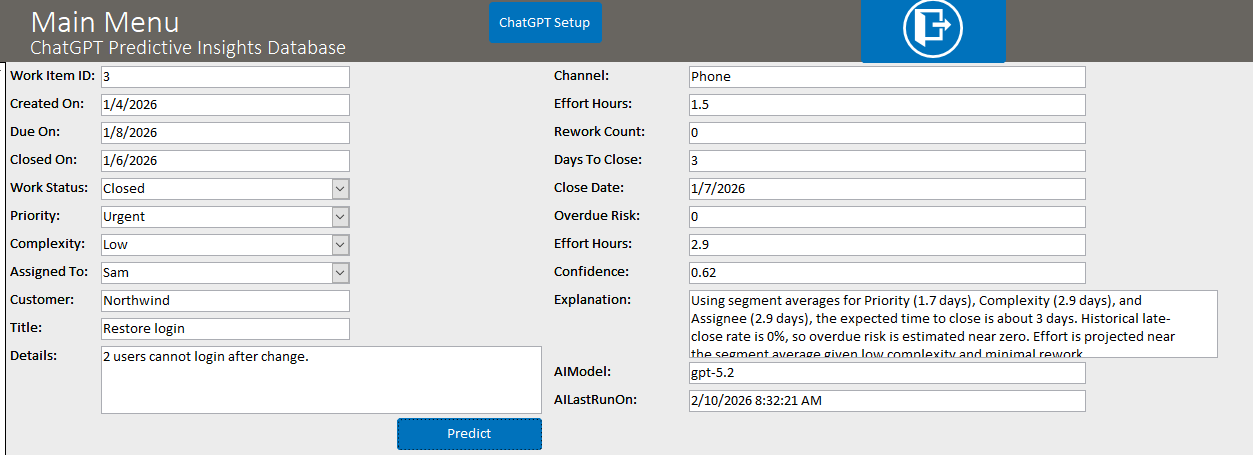
The template uses a straightforward work-item/ticket table with a mix of closed historical records and open/in-progress items. With one click—such as “Predict Current”—Access calls AI and returns structured predictions that are stored directly in normal table fields. Examples include Predicted Days to Close, Predicted Close Date, Overdue Risk (0–1), Predicted Effort Hours, and a brief explanation + confidence score so users understand why the prediction was made. You can also run a batch prediction for all open items and then display results in a simple dashboard sorted by the highest overdue risk. If you want this style of predictive insight tailored to your real data model and real workflows, Contact Us.
What This Template Predicts
This is a “starter” predictive model designed for clarity. It combines simple historical patterns (how long similar items took in the past) with AI’s ability to interpret context such as priority, complexity, assignee, channel, rework counts, and notes. The goal is to produce predictions that are easy to understand and actionable immediately.
- Predicted Days to Close: A practical estimate of how long this item will take to complete.
- Predicted Close Date: A forecasted completion date users can compare to the due date.
- Overdue Risk (0–1): A simple probability-style score estimating the chance the item finishes after the due date.
- Predicted Effort Hours: A rough estimate of effort to help capacity planning and scheduling.
- Confidence + Explanation: A short explanation and confidence score to keep predictions transparent and reviewable.
Why Predictive Insights Matter in Access
Many teams run their operations from an Access database. When deadlines slip, it’s often not because people are careless—it’s because the “risk signals” were buried in the data. Predictive insights help surface those signals early. Even a simple forecast can reduce last-minute fire drills by helping users focus on the items that are most likely to create problems.
- Better prioritization: Focus first on items with high overdue risk, not just the loudest request.
- Improved planning: Forecast effort and likely completion dates to plan staffing and schedules.
- More realistic expectations: Set better timelines with stakeholders by using patterns from your own historical data.
- Fewer surprises: Identify “at-risk” work earlier, when it is cheaper and easier to fix.
Simple Dashboard: “What Should We Worry About Today?”
To make the results immediately useful, the template includes a simple query/dashboard concept that lists open items sorted by highest overdue risk (and optionally highest confidence). This makes the demo feel real: a manager or team lead can quickly scan the list and decide where to intervene—reassign work, clarify requirements, reduce scope, or move the due date proactively.
- Open items ranked by risk: A fast “triage list” for daily stand-ups or weekly review meetings.
- Batch predictions: Run predictions across all open items to keep the dashboard updated.
- Human-in-the-loop: Predictions inform decisions, but users remain in control of actions.
How WSI Expands This Into a Production-Ready Solution
This template demonstrates the concept with a small dataset and lightweight logic. In real databases, WSI can make predictive insights more accurate and more valuable by aligning them to your environment—your process stages, your definitions of “done,” your due date rules, your customer tiers, and the true drivers of delays.
- Use your real history: Train prompts and logic around your actual closed records and outcomes.
- Add the right signals: Include fields that matter in your business (department, queue, product line, SLA, approval steps).
- Smarter scheduling: Produce forecasts by assignee workload or team capacity for better planning.
- Governance and auditability: Optional logging and controlled outputs so predictions are explainable and reviewable.
If you want predictive insights built into your Microsoft Access database—so your team can plan ahead instead of reacting late—Contact Us. Tell us what you track today and what you wish you could predict (delivery dates, overdue risk, workload, churn risk, inventory shortages, and more). We’ll recommend a simple first version that delivers value quickly and can expand over time.
If you're considering integrating this capability into a .NET application, another language model, or any API resource, WSI stands ready to assist. Connect with us for tailored solutions for your unique Microsoft Access and API integration needs.
Purchase Prices
$99.99—Internal Use—This product allows you to use this database template however you wish within your organization.
$199.99—Unlimited Developer Use—This version allows you to use this database template however you wish for any applications you develop and distribute.
Download a Demonstration
Download a demo version for free to test! The demo version is in Access 2010, which will work with either Access 2010, 2013, 2016, 2019 or Office 365. If you need a previous version of Access to try, please
Contact Us. Please note that the demo version of the software is fully functional, but does not store any data once you close the database; the full version of the software, available for purchase, stores data in the database permanently.
The ChatGPT Microsoft Access Predictive Detection Database is a full-featured ChatGPT management system built all in Microsoft Access tables, forms, reports, and VBA (Visual Basic for Applications) code. This database template has the advantage of being 100% Access based. This aspect allows for smooth and easy integration into your existing Access Database. The ChatGPT Microsoft Access Natural-Language Search Database offers a simple interface to generate a database question and get a response.
A ChatGPT open AI API key is required to run the code - which can be attained at: ChatGPT
Download a Demonstration
Download a demo version for free to test! The demo version is in Access 2010, which will work with either Access 2010, 2013, 2016, 2019 or Office 365. If you need a previous version of Access to try, please
Contact Us. Please note that the demo version of the software is fully functional, but does not store any data once you close the database; the full version of the software, available for purchase, stores data in the database permanently.
Full Version and Live Demonstration Options
Live demonstration
To experience a more interactive and personalized demonstration of this WSI template, we invite you to contact WSI and schedule a live demonstration with one of our team members. This opportunity allows you to engage directly with us, either as an alternative to or in conjunction with downloading and exploring the demo version of the template at your leisure.
Please note that downloading Microsoft Office files, including Microsoft Access database files, might trigger a security warning on your computer. To avoid this and get a comprehensive overview, you have the option of viewing the template through a virtual meeting on Teams or Zoom with a WSI representative.
After purchase
Once you purchase the database template, you will receive the full version of the database in a standard Access Database file. The purchased database will have full access to the database window, all design objects, the Visual Basic project code, and you will be able to modify or add to the design in any way you wish. This does not apply to run-time or compiled versions.
If you lack the time to integrate this database into your system, please Contact Us and we will be glad to help with your integration process. If you like the basics of what you see in the database, but need enhancements to make the system functional for your business, please Contact Us and we will develop a quote for the additional features you require.
Purchase Prices
$99.99—Internal Use—This product allows you to use this database template however you wish within your organization.
$199.99—Unlimited Developer Use—This version allows you to use this database template however you wish for any applications you develop and distribute.
After Your Purchase
Delivery timing
Once your purchase is complete, you will receive an email within 12 hours, and usually sooner during standard business hours, with a link to download the full version of the database. Please check your junk mail folder if you do not see the message.
Implementation help
If you need help implementing this function or need modifications for your requirements, request a free quote for your Microsoft Access development needs. WSI will determine your needs based on written requirements that you provide. Please ask your WSI representative for an example of sufficient written requirements.
Support and customization
WSI offers optional paid support and customization programming services. WSI templates are priced based on the purchaser self-supporting the database. WSI assumes purchasers who do not wish to pay WSI for support have the Microsoft Access and SQL Server knowledge needed to install, customize, and use the template. Paid support is available by the hour; please contact us for the current hourly fee.
Planning your changes
If you need assistance preparing requirements, WSI offers fee-based services to help document what needs to be done. You can also review our process mapping service or learn more about the WSI quoting process.
Testimonials
What Customers Say About WSI
"Once again, you guys have outdone yourself. The service and support you have provided has been the best I've ever experienced from a software development team. You guys have the best Access calendar GUI I've ever seen."
Mike Mattas
New-Tech Systems
Plainfield, IL
"Thanks to all!! Nice job on the changes. They look good, thanks for your quick response!!"
George Ells
Tulip Systems, Inc.
Pittsburgh, PA
"Thanks for all your help. Your service is great as I find you and your team easy to deal with and very responsive in terms of getting the changes done. Great work."
Steve Da Silva
Manager, Customer Support
The Hospital for Sick Children
Toronto, Ontario, Canada
"With the expertise of Andres the database was put in the store for use just 4 days later. The efficiency of his programming and the added benefit of video to refer back to in case of small adjustments brought what seemed like a daunting task into reality very quickly."
Debbie Hunt
Controller
Glendon Bald Eagle Holdings Ltd.
British Columbia, Canada
"Bottom Line: Winning Solutions is hands down the most polite, professional, committed, able, and proven company I have ever worked with. Their staff, top to bottom, are all winners."
Dave Yeadon
Dakota Steel & Trim
Canton, SD
"Our Service Dept is enjoying the Calendar. We adapted the Enhanced Microsoft Access Calendar to meet our needs. The Service Manager and Advisors enjoy the ease of booking work."
Richard "Dick" Milliken
Whited Peterbilt
Bangor, Maine